terça-feira, 30 de maio de 2023

One Reason Why InfoSec Sucked In The Past 20 Years - The "Security Tips" Myth

From time to time, I get disappointed how much effort and money is put into securing computers, networks, mobile phones, ... and yet in 2016 here we are, where not much has changed on the defensive side. There are many things I personally blame for this situation, and one of them is the security tips.

The goal of these security tips is that if the average user follows these easy to remember rules, their computer will be safe. Unfortunately, by the time people integrate these rules into their daily life, these rules either become outdated, or these rules were so oversimplified that it was never true in the first place. Some of these security tips might sound ridiculous to people in InfoSec nowadays, but this is exactly what people still remember because we told them so for years.

PDF is safe to open

This is an oldie. I think this started at the time of macro viruses. Still, people think opening a PDF from an untrusted source is safer than opening a Word file. For details why this is not true, check: https://www.cvedetails.com/vulnerability-list/vendor_id-53/product_id-497/Adobe-Acrobat-Reader.html
On an unrelated note, people still believe PDF is integrity protected because the content cannot be changed (compared to a Word document).
Image stolen from Kaspersky

Java is secure

One of the best ones. Oracle started marketing Java as a safe language, where buffer overflows, format strings and pointer-based vulnerabilities are gone. Unfortunately, they forgot to tell the world that instead of "unsafe programs developed by others" they installed their unsafe program on 3 billion devices. 

Stay away from rogue websites and you will be safe

This is a very common belief I hear from average people. "I only visit some trusted news sites and social media, I never visit those shady sites." I have some bad news. At the time of malvertising and infected websites, you don't have to visit those shady sites anymore to get infected.

Don't use open WiFi

I have a very long explanation of why this makes no sense, see here. Actually, the whole recommendation makes no sense as people will connect to public WiFis, no matter what we (InfoSec) recommend.

The password policy nightmare

Actually, this topic has been covered by myself in two blog posts, see here and here. Long story short: use a password manager and 2-factor authentication wherever possible. Let the password manager choose the password for you. And last but not least, corporate password policy sux.

Sites with a padlock are safe

We tell people for years that the communication with HTTPS sites are safe, and you can be sure it is HTTPS by finding a randomly changing padlock icon somewhere next to the URL. What people hear is that sites with padlocks are safe. Whatever that means. The same goes for WiFi - a network with a padlock is safe.

Use Linux, it is free from malware

For years people told to Windows users that only if they would use Linux they won't have so much malware. Thanks to Android, now everyone in the world can enjoy malware on his/her Linux machine.

OSX is free from malware

It is true that there is significantly less malware on OSX than on Windows, but this is an "economical" question rather than a "security" one. The more people use OSX, the better target it will become. Some people even believe they are safe from phishing because they are using a Mac!

Updated AV + firewall makes me 100% safe

There is no such thing as 100% safe, and unfortunately, nowadays most malware is written for PROFIT, which means it can bypass these basic protections for days (or weeks, months, years). The more proactive protection is built into the product, the better!

How to backup data

Although this is one of the most important security tips which is not followed by people, my problem here is not the backup data advise, but how we as a community failed to provide easy to use ways to do that. Now that crypto-ransomware is a real threat to every Windows (and some OSX) users, even those people who have backups on their NAS can find their backups lost. The only hope is that at least OSX has Time Machine which is not targeted yet, and the only backup solution which really works.
The worst part is that we even created NAS devices which can be infected via worms ...

Disconnect your computer from the Internet when not used

There is no need to comment on this. Whoever recommends things like that, clearly has a problem.

Use (free) VPN to protect your anonimity

First of all. There is no such thing as free service. If it is free, you are the service. On another hand, a non-free VPN can introduce new vulnerablities, and they won't protect your anonymity. It replaces one ISP with another (your VPN provider). Even TOR cannot guarantee anonymity by itself, and VPNs are much worse.

The corporate "security tips" myth

"Luckily" these toxic security tips have infected the enterprise environment as well, not just the home users.

Use robots.txt to hide secret information on public websites

It is 2016 and somehow web developers still believe in this nonsense. And this is why this is usually the first to check on a website for penetration testers or attackers.

My password policy is safer than ever

As previously discussed, passwords are bad. Very bad. And they will stick with us for decades ...

Use WAF, IDS, IPS, Nextgen APT detection hibber-gibber and you will be safe

Companies should invest more in people and less into magic blinking devices.

Instead of shipping computers with bloatware, ship computers with exploit protection software
Teach people how to use a password safe
Teach people how to use 2FA
Teach people how to use common-sense

Conclusion

Computer security is complex, hard and the risks change every year. Is this our fault? Probably. But these kinds of security tips won't help us save the world. 

Related articles


  1. Pentest Tools Open Source
  2. Hacker Tools Mac
  3. Android Hack Tools Github
  4. Nsa Hack Tools
  5. How To Install Pentest Tools In Ubuntu
  6. Hacking Tools Download
  7. Hacking Tools Download
  8. Pentest Tools
  9. Hack Tools 2019
  10. Pentest Box Tools Download
  11. Game Hacking
  12. Github Hacking Tools
  13. Pentest Tools Find Subdomains
  14. Pentest Tools Url Fuzzer
  15. Pentest Tools Linux
  16. Pentest Tools Android
  17. Pentest Tools Url Fuzzer
  18. Wifi Hacker Tools For Windows
  19. Pentest Tools Windows
  20. Hacking Tools And Software
  21. Hacker Techniques Tools And Incident Handling
  22. Hacking Tools
  23. Wifi Hacker Tools For Windows
  24. Pentest Tools Framework
  25. Hacking Tools Name
  26. Best Pentesting Tools 2018
  27. Hack Tool Apk No Root
  28. Free Pentest Tools For Windows
  29. Hacker Tools Windows
  30. Tools Used For Hacking
  31. Hacking Tools For Mac
  32. Usb Pentest Tools
  33. Pentest Tools Tcp Port Scanner
  34. Hack Tools Online
  35. Hack Rom Tools
  36. Pentest Tools Bluekeep
  37. Hack Tools Mac
  38. Pentest Tools Android
  39. Hack Tools
  40. Hacking Tools Github
  41. Pentest Tools Windows
  42. Hack And Tools
  43. Hacker
  44. Hacker Tools List
  45. Pentest Tools Subdomain
  46. Hacker Tools 2020
  47. What Is Hacking Tools
  48. Github Hacking Tools
  49. Hacker Tools Mac
  50. Hacking Apps
  51. Top Pentest Tools
  52. Hacking App
  53. Hack Rom Tools
  54. What Is Hacking Tools
  55. Hacking Tools Mac
  56. Pentest Tools Online
  57. Best Pentesting Tools 2018
  58. Hacker Techniques Tools And Incident Handling
  59. Pentest Tools Github
  60. Hack Website Online Tool
  61. Hack Tools Pc
  62. Wifi Hacker Tools For Windows
  63. Hacking Tools 2020
  64. Top Pentest Tools
  65. Termux Hacking Tools 2019
  66. Free Pentest Tools For Windows
  67. Pentest Tools Port Scanner
  68. Hacker Tools Free Download
  69. Best Pentesting Tools 2018
  70. Hacker Tools For Mac
  71. Pentest Tools Alternative
  72. Tools 4 Hack
  73. Hacking Tools Software
  74. Pentest Tools Linux
  75. Wifi Hacker Tools For Windows
  76. Hacker Tools For Pc
  77. Game Hacking
  78. Hacking Tools Kit
  79. Pentest Tools Windows
  80. Termux Hacking Tools 2019
  81. Hack Tools For Ubuntu
  82. Hacker Tools 2019
  83. Hacking Tools Usb
  84. Pentest Tools For Windows
  85. Hack And Tools
  86. Hacker Tools Free Download
  87. Hack And Tools
  88. Tools Used For Hacking
  89. Pentest Recon Tools
  90. Hack App
  91. Hacking Tools Software
  92. How To Install Pentest Tools In Ubuntu
  93. Best Hacking Tools 2019
  94. Hacker Tools Software
  95. Hack Tools
  96. Pentest Tools Alternative
  97. Install Pentest Tools Ubuntu
  98. Hak5 Tools
  99. Pentest Tools Nmap
  100. Pentest Tools Bluekeep
  101. Hacker Tools Mac
  102. Hacking Tools Pc
  103. Game Hacking
  104. Top Pentest Tools
  105. Hacking Tools Hardware
  106. Hack Tools Online
  107. Bluetooth Hacking Tools Kali
  108. Hacking Tools For Pc
  109. Android Hack Tools Github
  110. Hack Apps
  111. Hacker Tools Software
  112. Hacking Tools Usb
  113. Nsa Hack Tools Download
  114. Hacking Tools Windows
  115. Pentest Box Tools Download
  116. Hack Tools For Pc
  117. Underground Hacker Sites
  118. Hacking Tools Download
  119. Hacker Tools Apk Download
  120. Pentest Tools
  121. Pentest Tools Linux
  122. Pentest Tools Url Fuzzer
  123. Hack Tools Online
  124. Hack Tools
  125. Hacker Tools Mac
  126. Hacker Tools 2019
  127. Pentest Tools Kali Linux
  128. Hacker Tools 2020
  129. Hack Tools Download
  130. What Are Hacking Tools
  131. Hacker Tools Linux
  132. Hacker Tools Mac
  133. Hacker Tools For Pc
  134. Install Pentest Tools Ubuntu
  135. Hacker Security Tools
  136. Best Hacking Tools 2020
  137. Hacker Tools Mac
  138. Nsa Hacker Tools
  139. Hacker Tools For Pc
  140. Hacking Tools Usb
  141. Android Hack Tools Github
  142. Hack Tools Online
  143. Hacking Tools Hardware
  144. Hacker Techniques Tools And Incident Handling
  145. Pentest Tools Url Fuzzer
  146. Pentest Tools Nmap
  147. Hacking Tools Software
  148. Hack And Tools
  149. Hack Tool Apk
  150. Hacking Tools Mac
  151. Hacker Tools For Windows
  152. Hack Tools Pc
  153. Hacker

segunda-feira, 29 de maio de 2023

How Do I Get Started With Bug Bounty ?

How do I get started with bug bounty hunting? How do I improve my skills?


These are some simple steps that every bug bounty hunter can use to get started and improve their skills:

Learn to make it; then break it!
A major chunk of the hacker's mindset consists of wanting to learn more. In order to really exploit issues and discover further potential vulnerabilities, hackers are encouraged to learn to build what they are targeting. By doing this, there is a greater likelihood that hacker will understand the component being targeted and where most issues appear. For example, when people ask me how to take over a sub-domain, I make sure they understand the Domain Name System (DNS) first and let them set up their own website to play around attempting to "claim" that domain.

Read books. Lots of books.
One way to get better is by reading fellow hunters' and hackers' write-ups. Follow /r/netsec and Twitter for fantastic write-ups ranging from a variety of security-related topics that will not only motivate you but help you improve. For a list of good books to read, please refer to "What books should I read?".

Join discussions and ask questions.
As you may be aware, the information security community is full of interesting discussions ranging from breaches to surveillance, and further. The bug bounty community consists of hunters, security analysts, and platform staff helping one and another get better at what they do. There are two very popular bug bounty forums: Bug Bounty Forum and Bug Bounty World.

Participate in open source projects; learn to code.
Go to https://github.com/explore or https://gitlab.com/explore/projects and pick a project to contribute to. By doing so you will improve your general coding and communication skills. On top of that, read https://learnpythonthehardway.org/ and https://linuxjourney.com/.

Help others. If you can teach it, you have mastered it.
Once you discover something new and believe others would benefit from learning about your discovery, publish a write-up about it. Not only will you help others, you will learn to really master the topic because you can actually explain it properly.

Smile when you get feedback and use it to your advantage.
The bug bounty community is full of people wanting to help others so do not be surprised if someone gives you some constructive feedback about your work. Learn from your mistakes and in doing so use it to your advantage. I have a little physical notebook where I keep track of the little things that I learnt during the day and the feedback that people gave me.


Learn to approach a target.
The first step when approaching a target is always going to be reconnaissance — preliminary gathering of information about the target. If the target is a web application, start by browsing around like a normal user and get to know the website's purpose. Then you can start enumerating endpoints such as sub-domains, ports and web paths.

A woodsman was once asked, "What would you do if you had just five minutes to chop down a tree?" He answered, "I would spend the first two and a half minutes sharpening my axe."
As you progress, you will start to notice patterns and find yourself refining your hunting methodology. You will probably also start automating a lot of the repetitive tasks.

More info


  1. Pentest Tools For Windows
  2. Pentest Tools Online
  3. Hacker Techniques Tools And Incident Handling
  4. Hacker Tools Linux
  5. Hacker Security Tools
  6. Hacking Apps
  7. Hacker Tools 2019
  8. Blackhat Hacker Tools
  9. Hacker Tools
  10. Pentest Box Tools Download
  11. Pentest Tools Bluekeep
  12. Computer Hacker
  13. Hacking Tools Github
  14. Hacking Tools Online
  15. Hacking Tools For Mac
  16. Pentest Reporting Tools
  17. Pentest Tools Android
  18. Top Pentest Tools
  19. Best Hacking Tools 2020
  20. Hacker Tools Free
  21. Hacking Tools Mac
  22. Hacking Tools Hardware
  23. Hacking Tools 2020
  24. Pentest Automation Tools
  25. Hacker Security Tools
  26. Hacker Search Tools
  27. New Hack Tools
  28. Hacking Tools Pc
  29. Ethical Hacker Tools
  30. Hacking Tools For Mac
  31. Pentest Tools
  32. Pentest Tools
  33. Kik Hack Tools
  34. Hacker Tools List
  35. Hacks And Tools
  36. Kik Hack Tools
  37. Best Hacking Tools 2020
  38. Nsa Hack Tools Download
  39. Pentest Tools Website
  40. Hacking Tools For Games
  41. What Is Hacking Tools
  42. Android Hack Tools Github
  43. Game Hacking
  44. Hacker Techniques Tools And Incident Handling
  45. Pentest Tools Nmap
  46. Pentest Tools Bluekeep
  47. Nsa Hack Tools
  48. Hacker Tool Kit
  49. Hacker Techniques Tools And Incident Handling
  50. Hacking Tools For Pc
  51. How To Hack
  52. Hacking App
  53. Pentest Tools Alternative
  54. Hacking Tools For Windows 7
  55. Top Pentest Tools
  56. Pentest Tools For Mac
  57. Hack App

Msticpy - Microsoft Threat Intelligence Security Tools

Microsoft Threat Intelligence Python Security Tools.

msticpy is a library for InfoSec investigation and hunting in Jupyter Notebooks. It includes functionality to:

  • query log data from multiple sources
  • enrich the data with Threat Intelligence, geolocations and Azure resource data
  • extract Indicators of Activity (IoA) from logs and unpack encoded data
  • perform sophisticated analysis such as anomalous session detection and time series decomposition
  • visualize data using interactive timelines, process trees and multi-dimensional Morph Charts

It also includes some time-saving notebook tools such as widgets to set query time boundaries, select and display items from lists, and configure the notebook environment.


The msticpy package was initially developed to support Jupyter Notebooks authoring for Azure Sentinel. While Azure Sentinel is still a big focus of our work, we are extending the data query/acquisition components to pull log data from other sources (currently Splunk, Microsoft Defender for Endpoint and Microsoft Graph are supported but we are actively working on support for data from other SIEM platforms). Most of the components can also be used with data from any source. Pandas DataFrames are used as the ubiquitous input and output format of almost all components. There is also a data provider to make it easy to and process data from local CSV files and pickled DataFrames.

The package addresses three central needs for security investigators and hunters:

  • Acquiring and enriching data
  • Analyzing data
  • Visualizing data

We welcome feedback, bug reports, suggestions for new features and contributions.


Installing

For core install:

pip install msticpy

If you are using MSTICPy with Azure Sentinel you should install with the "azsentinel" extra package:

pip install msticpy[azsentinel]

or for the latest dev build

pip install git+https://github.com/microsoft/msticpy


Documentation

Full documentation is at ReadTheDocs

Sample notebooks for many of the modules are in the docs/notebooks folder and accompanying notebooks.

You can also browse through the sample notebooks referenced at the end of this document to see some of the functionality used in context. You can play with some of the package functions in this interactive demo on mybinder.org.


Log Data Acquisition

QueryProvider is an extensible query library targeting Azure Sentinel/Log Analytics, Splunk, OData and other log data sources. It also has special support for Mordor data sets and using local data.

Built-in parameterized queries allow complex queries to be run from a single function call. Add your own queries using a simple YAML schema.

Data Queries Notebook


Data Enrichment

Threat Intelligence providers

The TILookup class can lookup IoCs across multiple TI providers. built-in providers include AlienVault OTX, IBM XForce, VirusTotal and Azure Sentinel.

The input can be a single IoC observable or a pandas DataFrame containing multiple observables. Depending on the provider, you may require an account and an API key. Some providers also enforce throttling (especially for free tiers), which might affect performing bulk lookups.

TIProviders and TILookup Usage Notebook


GeoLocation Data

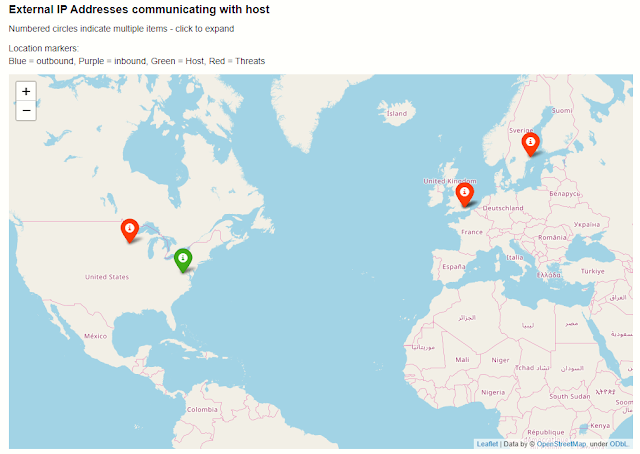
The GeoIP lookup classes allow you to match the geo-locations of IP addresses using either:

GeoIP Lookup and GeoIP Notebook


Azure Resource Data, Storage and Azure Sentinel API

The AzureData module contains functionality for enriching data regarding Azure host details with additional host details exposed via the Azure API. The AzureSentinel module allows you to query incidents, retrieve detector and hunting queries. AzureBlogStorage lets you read and write data from blob storage.

Azure Resource APIs, Azure Sentinel APIs, Azure Storage


Security Analysis

This subpackage contains several modules helpful for working on security investigations and hunting:


Anomalous Sequence Detection

Detect unusual sequences of events in your Office, Active Directory or other log data. You can extract sessions (e.g. activity initiated by the same account) and identify and visualize unusual sequences of activity. For example, detecting an attacker setting a mail forwarding rule on someone's mailbox.

Anomalous Sessions and Anomalous Sequence Notebook


Time Series Analysis

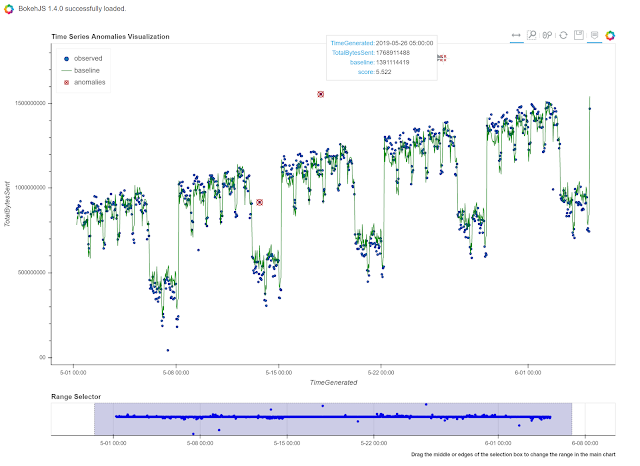
Time series analysis allows you to identify unusual patterns in your log data taking into account normal seasonal variations (e.g. the regular ebb and flow of events over hours of the day, days of the week, etc.). Using both analysis and visualization highlights unusual traffic flows or event activity for any data set.


Time Series


Visualization

Event Timelines

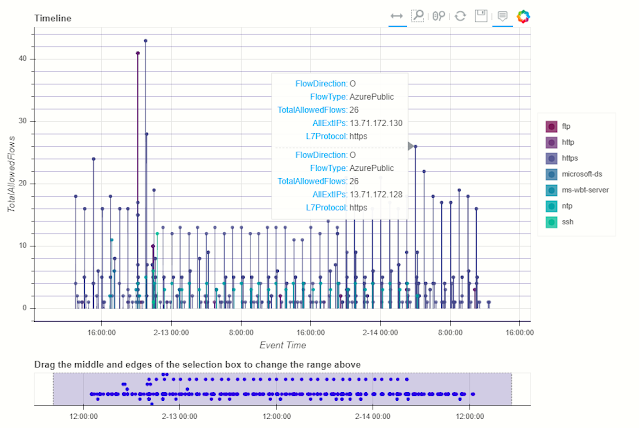
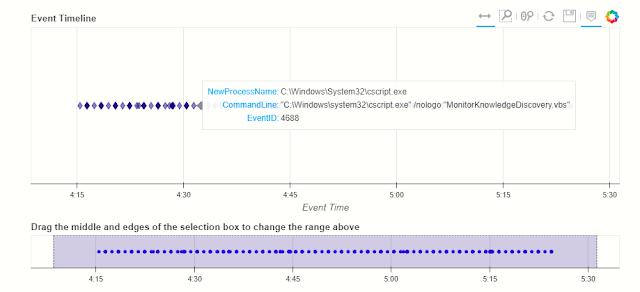
Display any log events on an interactive timeline. Using the Bokeh Visualization Library the timeline control enables you to visualize one or more event streams, interactively zoom into specific time slots and view event details for plotted events.


Timeline and Timeline Notebook


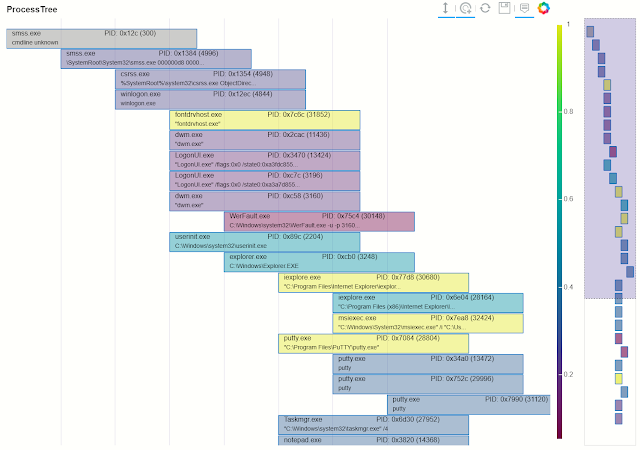
Process Trees

The process tree functionality has two main components:

  • Process Tree creation - taking a process creation log from a host and building the parent-child relationships between processes in the data set.
  • Process Tree visualization - this takes the processed output displays an interactive process tree using Bokeh plots.

There are a set of utility functions to extract individual and partial trees from the processed data set.


Process Tree and Process Tree Notebook


Data Manipulation and Utility functions

Pivot Functions

Lets you use MSTICPy functionality in an "entity-centric" way. All functions, queries and lookups that relate to a particular entity type (e.g. Host, IpAddress, Url) are collected together as methods of that entity class. So, if you want to do things with an IP address, just load the IpAddress entity and browse its methods.

Pivot Functions and Pivot Functions Notebook


base64unpack

Base64 and archive (gz, zip, tar) extractor. It will try to identify any base64 encoded strings and try decode them. If the result looks like one of the supported archive types it will unpack the contents. The results of each decode/unpack are rechecked for further base64 content and up to a specified depth.

Base64 Decoding and Base64Unpack Notebook


iocextract

Uses regular expressions to look for Indicator of Compromise (IoC) patterns - IP Addresses, URLs, DNS domains, Hashes, file paths. Input can be a single string or a pandas dataframe.

IoC Extraction and IoCExtract Notebook


eventcluster (experimental)

This module is intended to be used to summarize large numbers of events into clusters of different patterns. High volume repeating events can often make it difficult to see unique and interesting items.


This is an unsupervised learning module implemented using SciKit Learn DBScan.

Event Clustering and Event Clustering Notebook


auditdextract

Module to load and decode Linux audit logs. It collapses messages sharing the same message ID into single events, decodes hex-encoded data fields and performs some event-specific formatting and normalization (e.g. for process start events it will re-assemble the process command line arguments into a single string).


syslog_utils

Module to support an investigation of a Linux host with only syslog logging enabled. This includes functions for collating host data, clustering logon events and detecting user sessions containing suspicious activity.


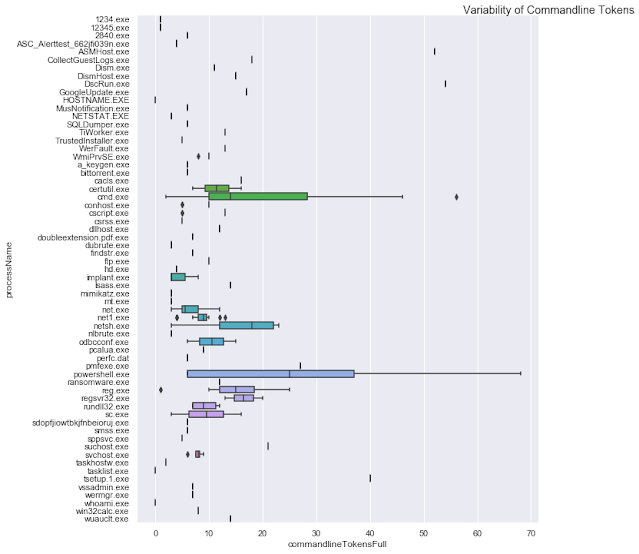
cmd_line

A module to support he detection of known malicious command line activity or suspicious patterns of command line activity.


domain_utils

A module to support investigation of domain names and URLs with functions to validate a domain name and screenshot a URL.


Notebook widgets

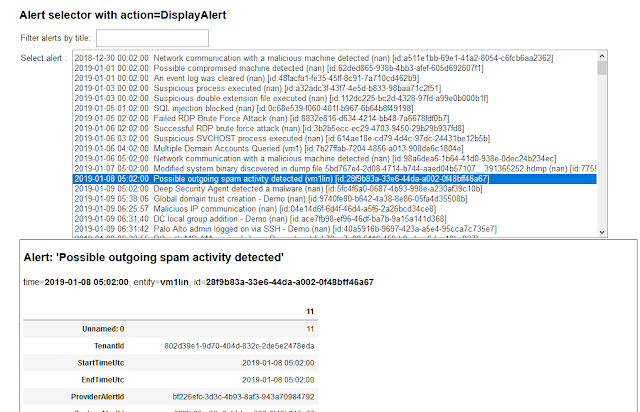
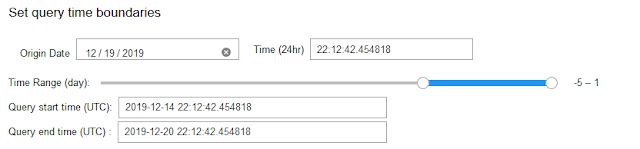
These are built from the Jupyter ipywidgets collection and group common functionality useful in InfoSec tasks such as list pickers, query time boundary settings and event display into an easy-to-use format.


More Notebooks on Azure Sentinel Notebooks GitHub

Azure Sentinel Notebooks

Example notebooks:

View directly on GitHub or copy and paste the link into nbviewer.org


Notebook examples with saved data

See the following notebooks for more examples of the use of this package in practice:


Supported Platforms and Packages

Contributing

For (brief) developer guidelines, see this wiki article Contributor Guidelines

This project welcomes contributions and suggestions. Most contributions require you to agree to a Contributor License Agreement (CLA) declaring that you have the right to, and actually do, grant us the rights to use your contribution. For details, visit https://cla.microsoft.com.

When you submit a pull request, a CLA-bot will automatically determine whether you need to provide a CLA and decorate the PR appropriately (e.g., label, comment). Simply follow the instructions provided by the bot. You will only need to do this once across all repos using our CLA.


More articles


  1. Hacker Tools 2019
  2. Pentest Tools Online
  3. Pentest Tools List
  4. Pentest Tools Nmap
  5. Hacking Tools Download
  6. Pentest Tools Website
  7. Bluetooth Hacking Tools Kali
  8. Hack Tools For Mac
  9. Hack Tools For Ubuntu
  10. Hacking Tools Hardware
  11. Pentest Tools Free
  12. Pentest Tools For Windows
  13. Bluetooth Hacking Tools Kali
  14. Free Pentest Tools For Windows
  15. Hacker Tools Free
  16. Hacking Tools For Kali Linux
  17. Hack Tool Apk No Root
  18. Pentest Tools For Android
  19. Hack Tools For Ubuntu
  20. Pentest Tools Github
  21. Hacks And Tools
  22. Free Pentest Tools For Windows
  23. Hacking Tools Online
  24. Hacker Tools 2019
  25. Hacking Tools For Kali Linux
  26. Pentest Tools For Windows
  27. Pentest Tools Android
  28. Hacker Tools 2020
  29. Pentest Tools Android
  30. Hacking Tools And Software
  31. Pentest Reporting Tools
  32. Hacker Tools Apk Download
  33. Hacker Tools Free
  34. Pentest Recon Tools
  35. Pentest Tools For Windows
  36. Tools 4 Hack
  37. Hacking Tools 2020
  38. Hack Tool Apk No Root
  39. Beginner Hacker Tools
  40. Hack Tools For Mac
  41. Hacking Tools Pc
  42. Hacker Tools Apk
  43. Pentest Reporting Tools
  44. Hacking Tools Usb
  45. Pentest Tools For Ubuntu
  46. Pentest Tools Review
  47. Hacker Tools Free
  48. Hack Tool Apk
  49. Hacker Tools For Ios
  50. Hacker Techniques Tools And Incident Handling
  51. Blackhat Hacker Tools
  52. Pentest Tools Linux
  53. Pentest Tools For Android
  54. Pentest Tools Review
  55. Hacking Tools For Windows
  56. Pentest Tools For Ubuntu
  57. Best Pentesting Tools 2018
  58. Hacker Tools Online
  59. Hacking Tools Software
  60. Nsa Hack Tools Download
  61. Hacker Hardware Tools
  62. Growth Hacker Tools
  63. What Are Hacking Tools